
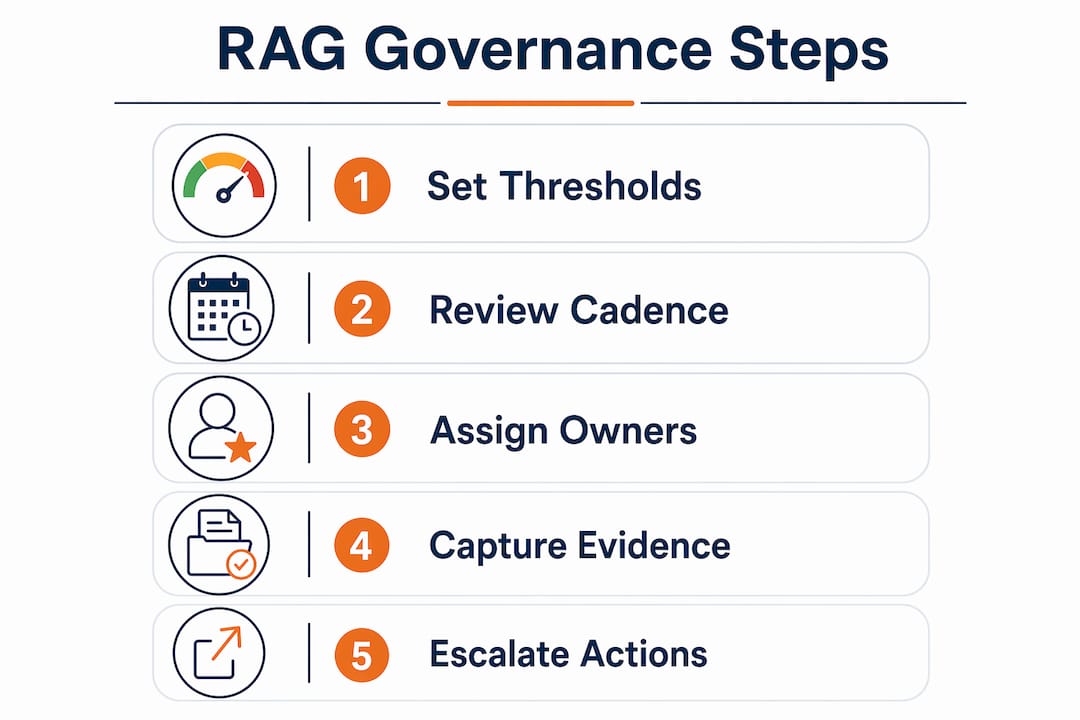
RAG status — Red, Amber, Green — is a visual reporting shorthand that tells decision-makers, at a glance, whether a project, metric, or regulatory obligation is on track, at risk, or in trouble. The single most important rule: never assign a colour without tying it to a measurable threshold. A Green that means "I feel fine about this" is worthless; a Green that means "budget variance is within ±5%" is auditable, defensible, and useful.
Three things you can act on today:
- Assign a metric owner to every RAG indicator before the next reporting cycle.
- Set a review cadence (weekly for active delivery, monthly for steady-state compliance) and stick to it.
- Require evidence for every rating: a named data source, a figure, and for any Amber or Red, a written "Road to Green" with milestones and a named accountable person.
Table of Contents
- What do RAG status thresholds look like in practice?
- How do you define objective RAG criteria for your programme?
- How do UK regulators and public bodies use RAG?
- What should each RAG colour actually trigger?
- Common mistakes that turn RAG into a blame tool
- How automation improves RAG accuracy and reduces admin
- Practical RAG templates you can use straight away
- Key takeaways
What do RAG status thresholds look like in practice?
Concrete thresholds are what separate a useful red amber green status from a subjective traffic light. The table below gives starting-point tolerance bands for the four metrics most commonly tracked in UK project and compliance reporting. Treat these as defaults, not absolutes: a safety-critical infrastructure programme will compress the Amber band; a low-risk internal IT project may widen it.
| Metric | Green | Amber | Red |
|---|---|---|---|
| Budget variance | Within a tight range near the approved budget | A moderate variance over or under the approved budget | A significant variance beyond the approved budget |
| Schedule variance | Within a tight range near the baseline dates | A moderate slippage on the critical path | A significant slippage or a missed milestone |
| Scope / quality | No unapproved changes; defect rate within agreed tolerance | Minor unapproved changes or defect rate approaching limit | Unapproved scope change or defect rate exceeding limit |
| Compliance metric | All obligations met; evidence filed | One obligation at risk; evidence partially complete | Obligation breached or evidence absent |
Commonly used tolerance bands suggest Green within a narrow range, Amber as a moderate variance, and Red as a significant deviation beyond those levels, but the bands must be adapted to context and project criticality.
Worked example — budget RAG: A project has an approved budget of £500,000. At month four, actual spend exceeds planned spend by a moderate amount. Under the table above, that qualifies as Amber status: a moderate variance. The project manager must now attach a one-line justification ("procurement delay caused front-loaded spend in month three") and a Road to Green ("reforecast by month five; contingency drawdown approved by sponsor").
Sub-RAGs and roll-ups: most programmes track budget, schedule, and scope as separate sub-RAGs, then roll up to a single project-level RAG. The standard rule is that the project-level colour equals the worst sub-RAG. Some PMOs apply weighting: schedule carries 40%, budget 40%, scope 20%, so a single Amber on scope does not automatically drag the whole project to Amber. Whatever rule you choose, document it before the first reporting cycle and apply it consistently.
When the Environment Agency or another UK regulator publishes EPA thresholds for performance metrics, those thresholds are not suggestions. Regulated organisations must use the regulator's published bands, not their own.
How do you define objective RAG criteria for your programme?
Subjective RAG calls are the root cause of most reporting failures. Here is a repeatable process for building definitions that hold up under scrutiny.
- List every metric you intend to rate. Be specific: "schedule" is not a metric; "days of slippage on the critical path" is.
- Identify the data source for each metric. Name the system, report, or document that will supply the raw figure at each review. If no reliable source exists, the metric is not ready to be RAG-rated.
- Set tolerance ranges. Use the table in the previous section as a starting point, then adjust for project criticality, regulatory requirements, and organisational risk appetite. Document the rationale.
- Define weighting and roll-up rules. Decide whether the project-level RAG is the worst sub-RAG or a weighted average, and record the decision in the programme definition document.
- Secure sign-off. The project sponsor or programme board must formally approve the definitions before the first reporting cycle. This creates the audit trail that regulators and internal assurance teams will expect.
- Embed reassessment in the governance calendar. Thresholds set at planning may become inappropriate as scope evolves. Build a quarterly threshold review into the programme board agenda.
Converting raw KPIs into RAG bands is straightforward once the tolerance ranges are fixed. For a schedule metric: if the critical-path slippage is S days and the baseline duration is D days, calculate the variance percentage as (S ÷ D) × 100. Map the result to the agreed bands. The same logic applies to budget variance, defect rates, and compliance scores.
Governance for definitions matters as much as the definitions themselves. Record who set each threshold, when, and on what evidence. If a threshold is changed mid-programme, log the reason and get the sponsor to countersign. That paper trail is what an auditor will ask for first.

Cadence: best practice calls for weekly reviews during active delivery phases and monthly reviews during steady-state operation or compliance monitoring. Never let a RAG go unreviewed for more than one reporting cycle without a documented reason.
Pro Tip: Require every Amber or Red call to include (a) a one-line justification citing the data, (b) a named owner, (c) the evidence document(s) attached, and (d) a Road to Green with at least two milestones and target dates. This single discipline eliminates "watermelon" reporting — projects that are Green on the outside and Red on the inside — almost entirely.
Consistency of definition across the organisation is more valuable than perfect thresholds. Start with pragmatic ranges and refine them with historical data after two or three reporting cycles.
How do UK regulators and public bodies use RAG?
UK regulators do not merely recommend RAG: in several sectors, they mandate specific thresholds and require organisations to report against them in prescribed formats.
The Environment Agency's Economic Performance Assessment (EPA) methodology for 2026–2030 publishes explicit RAG thresholds for water and sewerage company performance metrics. Those thresholds are binding for regulated utilities; a company cannot substitute its own tolerance bands for the regulator's published ones. The UK Statistics Authority applies a comparable approach: its methodology for assigning RAG status to 2021 Census returns sets out precise criteria for each colour, including the evidence required to support each call.
Environment Agency EPA principle (paraphrased from GOV.UK guidance): RAG thresholds for EPA metrics are set at the start of each price review period and published in the methodology document. Companies are assessed against those fixed thresholds; performance that falls into the Red band triggers a formal regulatory response, including a requirement to submit a remediation plan within a defined timescale.
For public-sector and regulated-sector users, the checklist below applies before any RAG report is submitted to a regulator or oversight body:
- Named accountable officer: every RAG call must carry the name and role of the person responsible for the metric.
- Audit trail: retain the underlying data, the calculation, and the evidence document for a minimum period consistent with your sector's records-management policy (typically five to seven years for regulated utilities).
- Evidence retention format: timestamped documents, version-controlled spreadsheets or platform exports, and a decision record noting any threshold change.
- Regulator threshold check: confirm at each reporting cycle that you are using the current published thresholds, not a prior version.
When quoting a regulator threshold in your internal RAG definitions, use this format: "[Metric name]: Green = [regulator's Green criterion as published]; Amber = [regulator's Amber criterion]; Red = [regulator's Red criterion]. Source: [regulator name], [document title], [publication date]. Next review: [date]." This makes it immediately clear to any auditor that the threshold is externally mandated, not internally set.
What should each RAG colour actually trigger?
A colour without a consequence is decoration. The table below sets out the standard escalation flow; adapt timescales to your governance framework, but treat the 48-hour acknowledgement for Red as a floor, not a target.
| Colour | Immediate action | Owner | Timescale |
|---|---|---|---|
| Green | No action required; record at next board | Metric owner | Next scheduled review |
| Amber | Raise mitigation plan; assign named owner; update Road to Green | Project/programme manager | Within 5 working days of rating |
| Red | Escalate to sponsor or programme board; submit recovery plan | Senior responsible owner (SRO) | Acknowledge within 48 hours; recovery plan within 10 working days |
Amber is frequently the most dangerous status because it can become a permissive buffer: teams assume someone else is watching it, and it drifts to Red unnoticed. Treat Amber as a ledge, not a waiting room.
Standard escalation sequence for Red:
- Metric owner identifies Red status against agreed threshold and records the data source.
- Owner notifies the project manager and SRO within 24 hours, attaching the evidence.
- SRO acknowledges within 48 hours and convenes an escalation call if required.
- Project manager submits a short-term stabilisation note (what stops the bleeding) within five working days.
- Full recovery plan, with milestones, resource requirements, and revised forecast, submitted within 10 working days.
- Programme board reviews the recovery plan at its next scheduled meeting; if the next meeting is more than 10 working days away, an extraordinary session is convened.
Roles and responsibilities must be documented in the programme governance framework, not assumed. Three roles matter most: the metric owner (the person who generates the data and assigns the colour), the approver (the project or programme manager who validates the call and signs off the Road to Green), and the escalation authority (the SRO or programme board chair who convenes recovery action for Red). No one person should hold all three roles for the same metric.
Embed RAG into your governance artefacts by including a standard RAG summary block in every highlight report, programme board paper, and regulatory return. PRINCE2 and the Association for Project Management both recommend that highlight reports carry a RAG summary at the top, with supporting narrative below, so decision-makers can act on the status without reading the full report.

Common mistakes that turn RAG into a blame tool
The most damaging failure mode is not a wrong threshold. It is a culture where Red is punished. When project managers learn that reporting Red triggers a difficult conversation rather than support, they report Amber instead. Amber accumulates. Problems compound. By the time Red appears, it is too late to recover cleanly.
APM-aligned guidance is explicit: leaders must treat Red as an early call for help, not evidence of failure. The practical implication is that a Red reported at week four, with a clear recovery plan, should be received more positively than an Amber that has sat unchanged for six weeks.
Four failure patterns to watch for:
- Inconsistent definitions: different teams applying different tolerance bands to the same metric, making portfolio-level roll-ups meaningless.
- Infrequent updates: RAG statuses that are refreshed monthly on a weekly-delivery programme, so the board is always looking at stale data.
- Watermelon reporting: Green at the surface, Red underneath. Prevented by mandatory evidence and commentary for every call.
- Suppressed Red: the most dangerous pattern. Spotted by auditing the gap between RAG history and actual outcomes: if projects that were Green or Amber at month six ended up in crisis at month eight, the earlier ratings were dishonest.
How to audit RAG calls: quarterly, pull the RAG history for a sample of closed projects and compare the final three months of reported status against the actual outcomes. If Amber statuses consistently preceded crises with no escalation, the escalation rules are not being followed. If Green statuses preceded surprises, the thresholds are too loose or the data sources are unreliable.
Pro Tip: Run anonymised RAG trend reviews at portfolio level: strip out project names and show the board only the colour distribution over time. This surfaces systemic under-reporting (a portfolio where Red never appears is almost certainly hiding problems) without singling out individual teams or managers.
How automation improves RAG accuracy and reduces admin
Manual RAG reporting in spreadsheets creates two problems: it is slow, and it is gameable. Automation enforces consistent definitions, reduces manipulation risk, and provides a single-source-of-truth dashboard that updates in real time rather than at the end of a reporting cycle.
The practical benefits of a continuous-assurance platform for RAG reporting:
- Automated roll-ups: sub-RAGs feed the project-level colour automatically, using the weighting rules configured at setup. No manual aggregation, no formula errors.
- Enforced commentary: the system will not accept an Amber or Red submission without a justification field and a Road to Green. This is the single most effective technical control against watermelon reporting.
- Automatic ageing: any RAG that has not been updated within the configured review window turns Grey (data missing) automatically, alerting the portfolio manager before the board meeting.
- Evidence attachment: documents are uploaded at the point of rating, timestamped, and linked to the specific metric and reporting period. The audit trail is built as a by-product of normal reporting.
- Export and integration: CSV exports and API connections allow RAG data to feed regulatory returns, programme board papers, and operational reporting workflows without re-keying.
The caveat is real: automation on poor data magnifies problems rather than solving them. Phase the rollout carefully: pilot on a single workstream, configure mandatory commentary and evidence fields, validate that the roll-up logic matches your governance rules, then scale. Premature automation of a broken manual process produces a broken automated process, faster.
Intelligentassessments is built specifically for this use case: weighted RAG scoring, mandatory evidence capture, automated AI executive summaries, and real-time dashboards in a single platform designed for regulated UK organisations. The assessment management platform replaces the spreadsheet-and-email cycle with structured frameworks that enforce the disciplines described throughout this article.
Practical RAG templates you can use straight away
RAG matrix template
Adapt the threshold cells to your programme's risk appetite and any regulator-mandated bands.
| Metric | Green | Amber | Red | Evidence required |
|---|---|---|---|---|
| Budget variance | ≤5% from approved budget | 5%–10% variance | >10% variance | Cost report, period-end actuals |
| Schedule variance | ≤5% slippage on critical path | 5%–10% slippage | >10% slippage or missed milestone | Programme schedule, baseline comparison |
| Scope / quality | No unapproved changes; defects within tolerance | Minor unapproved change or defects approaching limit | Unapproved change or defects exceeding limit | Change log, quality register |
| Compliance obligation | All obligations met; evidence filed | One obligation at risk; evidence partially complete | Obligation breached or evidence absent | Compliance register, evidence log |
Some organisations add a Blue (complete/closed) or Grey (data not yet available) to the standard three colours. Adding Blue or Grey prevents teams from defaulting to Green when data is absent, but each additional colour requires an explicit definition to avoid confusion.
Sample highlight report wording
Green: "[Metric] is Green. [Data source] confirms [figure] against a target of [figure]. No action required. Next review: [date]."
Amber: "[Metric] is Amber. [Data source] shows [figure] against a target of [figure], a variance of [%]. Owner: [name]. Mitigation: [one sentence]. Road to Green: [milestone 1 by date]; [milestone 2 by date]."
Red: "[Metric] is Red. [Data source] confirms [figure] against a target of [figure], a variance of [%]. Escalated to [SRO name] on [date]. Short-term stabilisation: [one sentence]. Full recovery plan due: [date]."
One-page implementation checklist
- Define every metric to be RAG-rated and name the data source for each.
- Set tolerance ranges and roll-up rules; secure sponsor sign-off before the first reporting cycle.
- Agree review cadence (weekly or monthly) and embed it in the governance calendar.
- Configure evidence requirements: justification, named owner, Road to Green for every Amber or Red.
- Automate where possible: use a platform that enforces commentary fields and timestamps evidence.
- Conduct the first audit after three reporting cycles: compare RAG history against actual outcomes and adjust thresholds if needed.
Storing the evidence trail: every RAG call should generate a timestamped record containing the metric value, the data source, the assigned colour, the justification, the named owner, and any attached evidence documents. Store these records in a system that prevents retrospective editing without a logged change reason. For regulated organisations, the retention period is typically set by the relevant sector regulator; confirm the requirement with your compliance team.
Intelligentassessments makes it straightforward to put all of this into practice. The platform enforces weighted RAG scoring, mandatory evidence capture, and Road to Green creation at the point of rating, then surfaces everything in real-time dashboards and instant PDF reports. If you want to see how it works against your own metrics, book a demo and the team will walk you through a live configuration.
Key takeaways
Objective RAG status requires measurable thresholds, mandatory evidence, and a culture where Red is treated as a call for support rather than a mark of failure.
| Point | Details |
|---|---|
| Tie colours to thresholds | Green, Amber, and Red must map to specific, agreed tolerance bands — not subjective judgement. |
| Amber demands active mitigation | Treat Amber as a ledge requiring an immediate mitigation plan and named owner, not a passive watch status. |
| Red triggers a timed escalation | Acknowledge Red within 48 hours; submit a full recovery plan within 10 working days. |
| Regulators set binding thresholds | UK bodies such as the Environment Agency publish mandatory RAG bands; regulated organisations must use them. |
| Automation enforces discipline | Platforms that enforce commentary and evidence capture reduce watermelon reporting and build the audit trail automatically. |